ComfyUI expresses a generation as a graph, connecting models, conditioning, samplers, reference images, ControlNets, decoders, and save nodes. It does not keep durable memory around that graph.
Once I had two workers producing thousands of images and videos, I needed to track what happened outside the node editor:
- outputs that shared the same underlying recipe;
- settings that consistently produced work I kept;
- completed, active, and vanished jobs after a worker restart;
- retries that did not overwrite previous attempts;
- images reused as inputs to later images or videos;
- agent work that used the same inspection, organization, and launch controls I use;
- the path from a good generation to a character, location, shot, selected take, scene, and finished cut.
I first built Comfy Generation Manager as a gallery and queue manager. It now has a React interface over FastAPI, a durable SQLite queue, filesystem metadata ingestion, workflow analysis, human review, preference learning, agent tools, optional cloud generation, and a production Studio for assembling generated media into films.
The architecture in one view
The current source snapshot contains roughly 33,800 tracked lines, 104 FastAPI routes across 15 routers, 27 SQLite tables, 83 MCP tools, and nine curated workflow definitions. Here is how those pieces connect:
                         human operator
                              |
                              v
                 React 19 + TypeScript SPA
                              |
                         JSON over HTTP
                              |
Claude Code / Codex           v                Codex CLI
        |              FastAPI manager             ^
        | MCP over stdio      |                     |
        +-------------------->|---------------------+
                              |
              +---------------+----------------+
              |               |                |
              v               v                v
        durable SQLite   mounted media     background loops
        state + queue    and input files   dispatcher/import/
              |                            backup/taste/cloud
              |
              +----------+-----------+-------------+
                         |           |             |
                         v           v             v
                    ComfyUI 0    ComfyUI 1    Gemini / FAL
                    over HTTP    over HTTP     optional APIs
The browser is the visual review and approval surface. SQLite is the source of truth for intent and state. Large media stays on disk. ComfyUI and the optional cloud providers execute jobs, but they do not own the queue. Agents can operate the same system through MCP, while the manager can invoke Codex for bounded, structured analysis.
I kept four boundaries consistent:
- The database stores meaning; the filesystem stores media. A generation row can carry prompts, dimensions, workflow identity, review data, lineage, project context, and execution history without copying a multi-megabyte or multi-gigabyte asset into SQLite.
- A job and an attempt are different things. The job is the durable intent. Every execution gets its own attempt row, submitted graph, worker, prompt ID, timestamps, output path, and error history.
- Every launch becomes a durable job. The web UI, agent tools, definitions, remix actions, and Studio renders all use that path. The dispatcher and cloud executors remain responsible for submission.
- Accepted Codex suggestions go through application services. Codex can analyze, recommend, classify, and draft. Organization and production changes remain review-first.
What the product does
The main navigation has eight surfaces, with another seven views inside Studio:
| Surface | What it is for |
|---|---|
| Studio | Persistent production planning: bible, characters, locations, scenes, shots, boards, takes, playback, and export |
| Gallery | Infinite, filterable browsing across imported and manager-launched media |
| Review | Keyboard-first keep, drop, and skip decisions with structured feedback |
| Jobs | Live workers plus durable pending, submitted, running, completed, failed, and lost work |
| Insights | Win rates, coverage, runtime analysis, GPU comparisons, prompt signals, and learned taste |
| Workflows | Discovered graph families, variants, curated definitions, examples, launch controls, and organization |
| Create | Direct Gemini image and FAL Seedance video creation when those providers are configured |
| Agent | Operational recommendations, Codex harness status, launch plans, and a durable activity trail |
There is deliberately no global state framework in the frontend. TanStack Query owns server state, component hooks own local interaction state, and URL parameters own filters and cross-page scope. A filtered Gallery or Jobs view is therefore bookmarkable, shareable, and recoverable after a refresh.
Turning output folders into a generation database
The first problem was ingestion. ComfyUI writes media files; it does not write the product-level record I wanted to query.
The importer walks the configured output roots for both workers and recognizes PNG, JPEG, WebP, WebM, MP4, WAV, FLAC, MP3, and OGG. It can also read legacy batch manifests. A completed manager job takes a faster path: as soon as ComfyUI history returns exact output paths, the importer tries those files directly. A periodic scan catches anything missed because of restarts, temporary mount lag, or files created outside the manager.
Extracting provenance from the media itself
Images and videos often contain enough information to reconstruct how they were made, but only if the importer understands several metadata formats.
For images, Pillow reads dimensions and embedded tags. The importer also has a
small PNG chunk parser for plain tEXt, compressed zTXt, and international
iTXt chunks, so it preserves workflows across different encoder formats.
For video and audio, ffprobe supplies:
- stream types and codecs;
- width and height;
- duration and file size;
- whether an audio stream exists;
- format-level metadata, including an embedded
PROMPTgraph when present.
The metadata layer analyzes the graph and identifies:
- the operation, such as text-to-image, image-to-image, text-to-video, image-to-video, video-to-video, audio, segmentation, or text;
- model, VAE, CLIP, LoRA, and ControlNet loaders;
- samplers, schedulers, steps, CFG, denoise, and seeds;
- output/save nodes;
- source image and media inputs;
- positive and negative prompts.
Prompt extraction follows conditioning edges back from samplers instead of assuming that the first text encoder is positive and the second is negative. Multiple prompt branches, refiners, or role-specific encoders can break that ordering.
Idempotent import without destroying human work
output_file is unique. Reimporting a known path refreshes machine-derived
metadata but leaves human review and organization fields intact. The same
operation also:
- registers the workflow and its identities;
- rebuilds input lineage;
- binds a matching manifest or manager job;
- propagates definition provenance;
- assigns production ownership when the launch came from Studio.
Normal scans skip files whose stored size and modification time still match. That turns a frequent safety scan into a mostly inexpensive stat walk instead of repeatedly decoding every media file.
The database is intentionally additive. If a file is removed outside the manager, its historical row is not silently deleted. That preserves the record, although it also means missing-media reconciliation is one of the areas I want to improve.
Lineage makes generations navigable
The importer checks each input asset against known output paths. When one
generation uses another as a reference, it writes a durable
generation_input_links row.
The detail view can therefore answer both directions:
What inputs produced this generation?
What later generations reused this output?
This is especially useful for reference-to-image, image-to-video, iterative editing, upscaling, and Studio take generation. The link keeps a promising still’s downstream history visible.
Gallery, projects, and the detail inspector
Gallery loads 48 items at a time and starts prefetching before the scroll sentinel reaches the viewport. The responsive grid grows from two to six columns, and videos remain unloaded until needed, with muted hover playback on capable devices.
Gallery stores these filters in the URL:
- text search across prompts and output paths;
- rating or review state;
- category and source manifest;
- worker;
- operation and media kind;
- model and LoRA;
- review tag and drop reason;
- workflow topology and variant;
- project and nested folder;
- Studio/non-Studio media;
- taste prediction;
- sort order.
Down-rated media is hidden by default, while production media can be shown or hidden explicitly. A project sidebar adds Everything, Unassigned, named projects, and nested folders. Projects can remain simple organizational containers or be upgraded into full Studio productions without losing their existing media or history. A Scan outputs action triggers an import reconciliation without restarting the service.
Opening a card shows the full media alongside its prompts, negative prompts, workflow and worker, runtime, model data, inputs, downstream uses, project placement, production links, notes, human feedback, taste prediction, and any Agent receipt attached to the launch. The viewer supports full-screen media, remembered theater mode, left/right navigation through the loaded result set, and keyboard dismissal.
Images can move directly into Gemini editing or Seedance animation. A definition-backed result can be remixed by replaying its normalized launch parameters. Older results fall back to editable prompt nodes over the captured workflow graph. Both remix paths create another durable job through the normal queue.
Human review is part of the data model
Review loads an unreviewed batch, shows one item at a time, and responds to:
U or Right Arrow  -> keep
D or Left Arrow   -> drop
S or Down Arrow   -> skip for this session
A review record can carry notes, structured scores, tags, and reasons. Quick Review exposes keep/drop/skip plus structured positive, quality, and preference tags; notes and drop reasons can be added from the detail inspector. The same screen puts the prompt, inputs, workflow, worker, agent rationale, and taste prediction beside the thumbnail.
A review can store several kinds of signal:
- “strong aesthetic” and “good motion” are different positive signals;
- “artifact,” “temporal instability,” and “identity/anatomy” are different technical failures;
- “too generic,” “wrong style,” and “not reusable” are preference failures.
When a review is saved, the client immediately patches cached generation lists and invalidates status, insights, taste, and detail queries. The next screen therefore reflects the decision without waiting for a broad refresh.
Saving a review changes Gallery visibility, workflow win rates, Insights rankings, Agent recommendations, and the learned taste profile.
The durable queue records jobs and attempts separately
Most of the recovery logic lives in the queue.
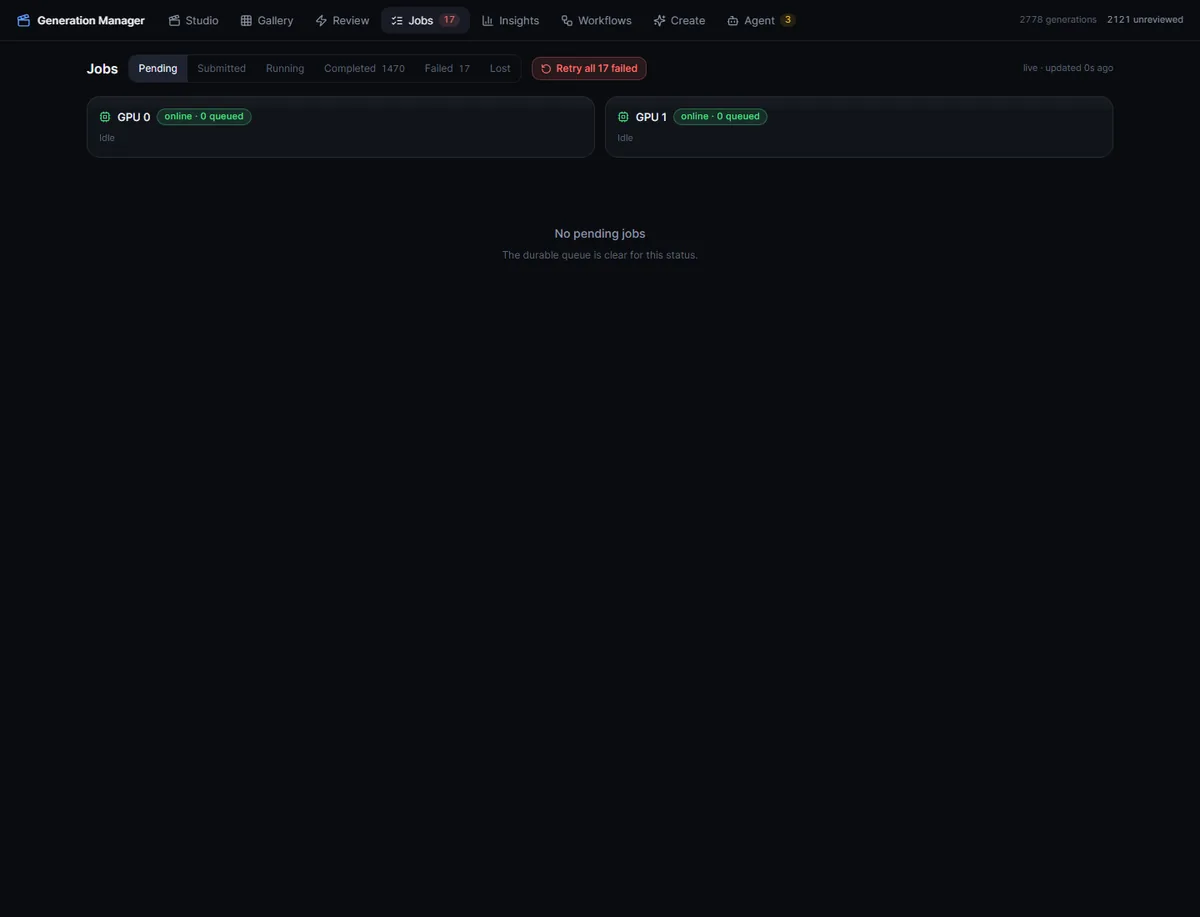
The Jobs view puts durable queue state beside each worker’s reachability and live queue depth.
A live Jobs view polls jobs and worker queues every 2.5 seconds. Worker cards show reachability, queue depth, active prompts, operation, and elapsed time. Rows expose the route explanation, assigned worker, runtime, attempt/error state, and Agent receipt. Pending work can be reprioritized, failed or lost work can be retried individually or together, and cancellation is available through the queue API.
A jobs row represents intent:
- backend;
- original prompt and captured workflow;
- priority;
- preferred and assigned worker;
- expected output;
- seed;
- status and attempt count;
- definition version and launch parameters;
- resulting generation.
A job_attempts row represents one execution:
- attempt number;
- unique prompt or remote request ID;
- worker;
- exact submitted workflow;
- topology, variant, and exact hashes;
- attempt-specific filename prefix;
- submitted, started, and finished times;
- expected and actual output;
- backend history and error.
A retry keeps the failure that caused it, and the graph stored on the job does not pretend to be the exact graph sent on every attempt.
Buffering two ComfyUI workers
The dispatcher polls on a short interval. For each worker it asks ComfyUI for
/queue, then compares:
- the total live queue depth, including prompts submitted outside the manager;
- active attempts recorded by the manager;
- the worker’s configured buffer;
- the global maximum queue depth.
Only the remaining slots are filled. Pending work is ordered by numeric priority and then FIFO job ID. The current deployment intentionally buffers one manager job per GPU, which trades a little theoretical throughput for lower memory pressure and much clearer recovery.
Launch-time auto-routing ranks workers by reachability and queue depth, then uses source-worker affinity and a stable ID as tie-breakers. The selected route and a human-readable reason are stored with the job. A manual worker choice remains a preference; the dispatcher can fail over if another worker has capacity.
Every attempt gets a new identity and output path
Immediately before submission, the dispatcher:
- increments the attempt number;
- rewrites recognized save nodes to an attempt-specific filename prefix;
- creates a new UUID prompt ID;
- computes workflow identity from the graph it will send;
- posts to ComfyUI’s
/prompt; - stores the attempt and updates the job.
An original output prefix might become:
scene-03/shot-04
scene-03/shot-04--attempt-02
scene-03/shot-04--attempt-03
Retries therefore preserve earlier outputs instead of quietly overwriting them.
Reconciliation instead of wishful thinking
Submitted work is reconciled against both /queue and
/history/{prompt_id}:
pending
   |
   v
submitted ---> running ---> completed ---> imported generation
   |              |
   |              +-------> failed
   |
   +-- absent from queue and history after grace period --> lost
                                                        |
                                                        v
                                                     pending
If a prompt is still visible, its attempt becomes running. If it disappears from the queue but exists in history, the manager completes or fails it from the recorded execution result. If it disappears from both, it is marked lost after a grace period and its job returns to pending.
A job that repeatedly vanishes is likely taking down a worker, for example because a model cannot fit. After five lost attempts, a circuit breaker fails the job terminally instead of creating an infinite crash loop.
When history reports media, the importer tries those exact outputs immediately.
If the mounted file is not visible yet, a coalesced full scan becomes the
fallback. Workflows that return text through nodes such as PreviewAny or
ShowText are stored as text generations with provenance and lineage even
though no media file was written.
Three levels of workflow identity
The complete-graph hash preserves forensic detail, but it cannot group normal runs because each new prompt or seed changes it.
Comfy Generation Manager computes three SHA-256-derived identities:
| Identity | Includes | Answers |
|---|---|---|
| Topology | Node IDs, class types, and edges | Is this the same graph shape? |
| Variant | Topology plus durable settings | Is this the same configured recipe? |
| Exact | Complete workflow JSON | Is this the exact submitted payload? |
Variant identity removes per-run values such as prompts, seeds, output filenames, and loader media paths. A text-to-video graph can therefore accumulate a meaningful win rate across hundreds of prompts while exact hashes still preserve reproducibility.
The registry aggregates generation counts, reviewed counts, win rate, job and attempt status, workers, operations, ratings, source provenance, last use, favorites, hidden state, notes, and variants. Automatically generated labels use detected model family, operation, sampler steps, LoRAs, context, and output profile rather than exposing only an opaque hash.
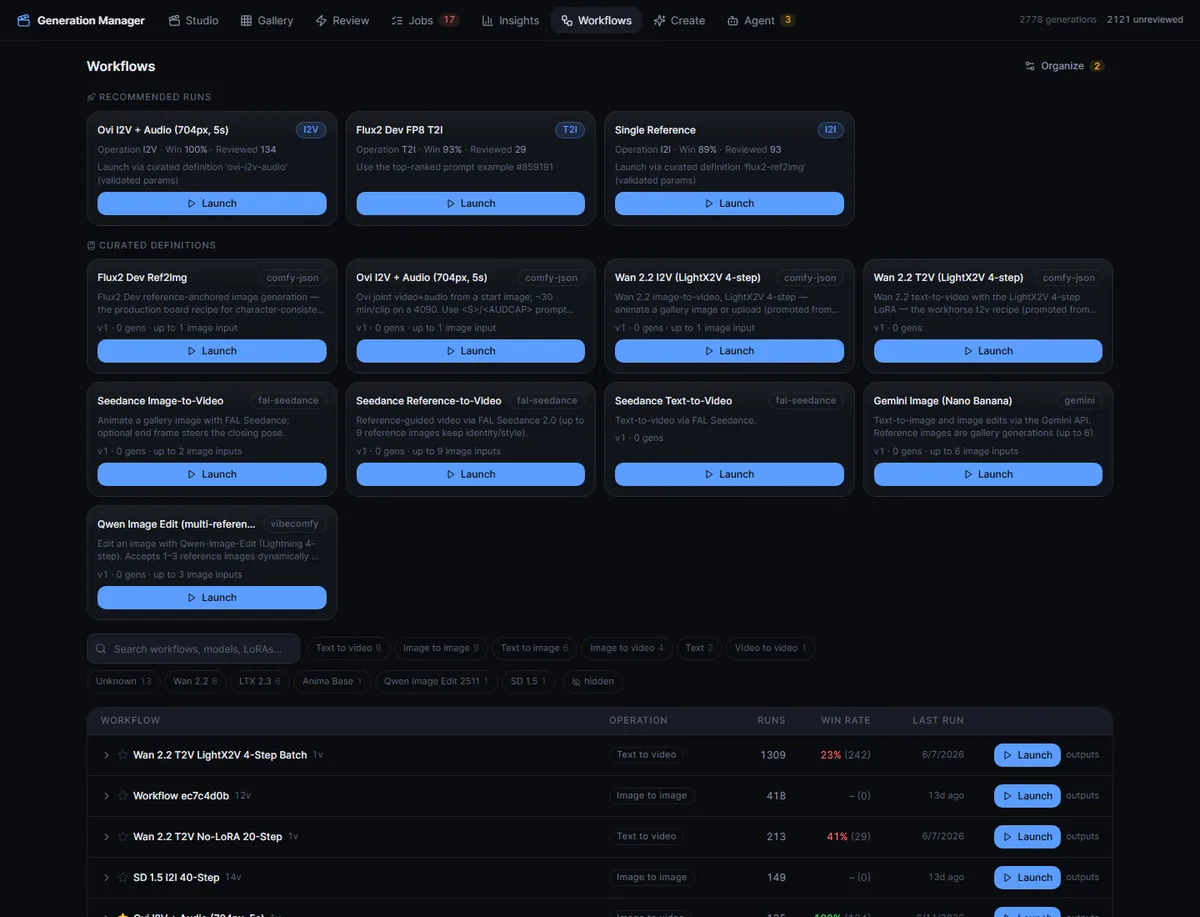
The workflow surface combines discovered graph identity with named, schema-driven recipes and evidence-based launch recommendations.
For a legacy relaunch, the manager prefers an up-rated generation, then unreviewed, then down-rated, then a known job payload, and finally a synthesized cloud registry graph. The UI can apply a prompt example from a successful run, change seeds, select one to 24 runs, set priority, choose auto or manual routing, and attach multiple named inputs.
The registry lets me rename, favorite, hide, annotate, inspect, and launch a topology or variant. I can also export, structurally preflight, import, and register workflow JSON. A separate organization screen turns proposed groups, assignments, labels, notes, and cleanup flags into accept/reject items before anything is applied.
Curated definitions make recipes replayable
Discovered workflows record what has run. Curated definitions specify what can be run again safely.
A definition is a named, versioned entity whose schema can contain:
- text;
- seed;
- bounded number;
- enum;
- boolean;
- media, including variadic media with accepted types and minimum/maximum counts.
For a normal ComfyUI graph, a starting schema can be derived from prompt nodes, seed-bearing nodes, and labeled image loaders. The definition then binds those semantic parameters to exact node inputs.
The backend schema generates the browser form, so the client does not scrape a recent generation or keep a second workflow definition. Gallery references and uploaded files become normalized media parameters, and the server enforces required values, ranges, enum membership, media types, and counts.
Each launched job stores:
definition ID
definition version
normalized launch parameters
compiled workflow identity
Those fields propagate to the resulting generation. A future remix can replay the original parameter set rather than trying to reverse-engineer it from a graph.
On-disk definitions are the source of truth. The manager synchronizes them at startup, and changes to the schema, graph, or template participate in a content hash that normally advances the version.
The current library covers Comfy JSON recipes, a VibeComfy template, Gemini image generation/editing, and FAL Seedance text-to-video, image-to-video, and reference-to-video operations.
Dynamic graphs with VibeComfy
Some recipes do not have one fixed graph shape. A multi-reference edit may need one loader branch for one image and three branches for three images.
VibeComfy is used as a compile-only layer:
typed definition parameters
          |
          v
shape key, for example {"image_count": 3}
          |
          v
isolated VibeComfy Python environment
          |
          v
compiled Comfy API JSON + semantic input map
          |
          v
CGM preflight, hashing, durable job, dispatcher
It never submits directly to a worker. The compiled result returns to the same manager launch path as every other Comfy job.
Compiled shapes are cached by definition, definition content hash, and a
canonical shape key. The cache stores the API graph, input map, and CGM’s own
hashes. A host-side bridge can pull a registered workflow, refresh schemas from
ComfyUI’s /object_info, port API JSON into editable Python, validate and
compile it, promote it into a definition, and push precompiled shapes when the
container compiler is unavailable.
VibeComfy handles graph construction. The manager continues to own preflight, provenance, queueing, recovery, and import.
Optional Gemini and FAL backends use the same contract
The Create page exposes two optional provider-backed surfaces:
- Gemini image generation and reference-based editing;
- FAL Seedance text-to-video, image-to-video, and multi-reference video.
There is no Settings page for keys. Provider credentials are configured in the manager environment, and the forms explain when a backend is unavailable.
Gemini creation supports prompt, model, aspect ratio, resolution, priority, reference images, and output count. Every requested image becomes a durable job. The executor uses a bounded thread pool, writes the resulting PNG atomically with workflow metadata, inserts a normal generation, and completes the job transactionally.
Seedance exposes only options supported by the selected model: mode, resolution, duration, aspect ratio, reference count, first/end frame, audio, and fixed-camera behavior. The FAL executor uploads local references, persists the remote request envelope, polls status, supports cancellation, reattaches to in-flight requests after restart, downloads the result, probes it, and inserts it into the same generation model.
Local ComfyUI, Gemini, and FAL all use the same lifecycle:
job -> attempt -> output -> generation -> review -> insights -> lineageLocal and cloud media share the same Gallery, review model, and project system.
Insights measures review results

The summary shows aggregate coverage and accuracy without publishing the private taste profile beneath it.
For the current filter scope it computes:
- total generations and review coverage;
- human keep rate;
- workflow, model, category, operation, media, worker, LoRA, tag, and reason rankings;
- median and p90 runtime;
- cross-worker runtime differences for comparable workflows;
- prompt terms correlated with wins and failures;
- low-sample warnings;
- concise, severity-coded takeaways.
Stable dimensions link back to a filtered Gallery. Clicking an unexpected win rate or GPU slowdown opens the underlying media.
A versioned taste profile
Aggregate win rates describe populations. The taste worker tries to describe my actual preferences.
It learns from new keep/drop decisions, prioritizes prediction misses because contradictions contain the most information, and alternates learning work with prediction work so one queue does not starve the other.
Before invoking Codex, it constructs visual evidence:
- a normalized image for stills;
- frames near 10%, 50%, and 90% for video;
- source images as additional evidence for image-to-video when available.
That last case helps separate a weak source image from weak motion. Temporary frames are root-contained and removed after analysis.
The structured result can update:
- likes and dislikes;
- style rules;
- effective and ineffective prompt patterns;
- project/category-specific guidance;
- open questions.
Each full profile is versioned. Predictions store keep/drop, confidence, rationale, signals, profile version, and eventual human outcome. The dashboard reports overall and recent accuracy against the eventual human decision.
The same profile is rendered into deterministic Markdown and mirrored as an agent skill. Human review in the browser can thus influence how a future agent prompts, selects, and evaluates media. The background worker can be paused, resumed, or run immediately, and its status reports pending reviews, prediction misses, unpredicted items, and the most recent error.
Agents operate in both directions
The system has two different agent paths:
- An external Claude Code or Codex session operates the manager through MCP.
- The manager invokes the bundled Codex CLI for structured analysis and production drafts.
They meet in FastAPI and SQLite, but they have different responsibilities.
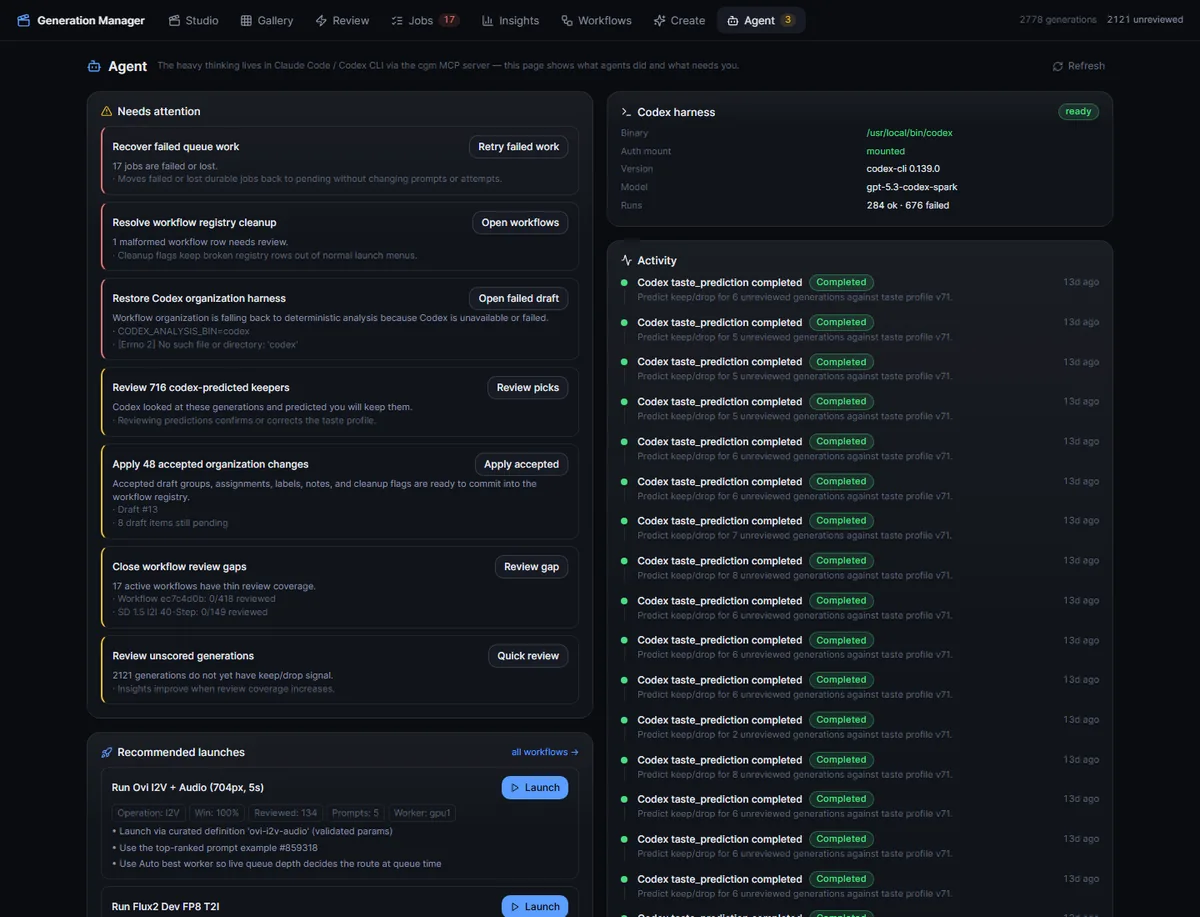
Agent collects operational recommendations, launch plans, and activity receipts in one view.
Deterministic recommendations before language-model reasoning
The Agent page builds many recommendations from normal application state:
- failed or lost jobs that can be recovered;
- active agent-launched work;
- unreviewed agent outputs;
- malformed workflow records;
- missing Codex readiness;
- organization drafts awaiting decisions;
- workflows with poor review coverage;
- high-evidence candidates for another launch.
Launch candidates are scored from status, favorites, win rate, review count, usage, job history, and the outcomes of prior agent launches. A recommended plan can carry a proven prompt example, randomized seeds, evidence, signals, rationale, live auto-routing, and a durable receipt.
The receipt follows the work into Jobs, Gallery, Review, and detail views. It records why the agent created the job.
The activity feed merges Codex analysis, workflow organization, Studio drafts, and agent-receipted launches into one reverse-chronological trail.
MCP uses the manager’s HTTP API
The MCP server is a small stdio FastMCP process that calls the manager’s HTTP API. It never opens SQLite directly.
The current source exposes 35 read tools and 48 write tools. Reads cover health, generations, jobs, failures, worker queues, workflows, definitions, launch options, insights, taste, Agent activity, projects, and production context. Writes cover launches, review, queue operations, organization, project/folder management, cloud jobs, bible versioning, production entities, references, takes, renders, drafts, and exports.
Mutation safety has two gates:
- write tools must be enabled when the MCP server starts;
- every write call must still include
confirm=true.
Generation calls also require a non-empty reason, cap the number of launches in one call, and refuse to add work above an active/pending queue ceiling. Paid cloud calls identify that they consume credits.
These protections apply only to the agent interface. The HTTP API still has no authentication, so the application remains a trusted-local tool.
The outbound Codex harness is bounded and structured
For a Codex analysis job, the backend creates a temporary workspace and writes:
- normalized input JSON;
- a strict JSON schema;
- a task-specific prompt;
- an optional production context pack;
- only the explicitly selected image attachments.
It runs an ephemeral codex exec with approvals disabled, a bounded timeout,
and a required structured output file. The result is parsed, validated again by
job-specific code, and recorded in SQLite with provider, model, status,
objective, errors, timestamps, and output paths.
Codex jobs are serialized through one process lock. Background taste work yields to an interactive Studio or organization request instead of competing for the same harness.
Studio turns generations into a production
Gallery tracks individual generations. Studio organizes them into a production.
A normal project can be production-enabled without moving or rewriting its media. This adds seven views:
- Overview;
- Bible;
- Characters;
- Locations;
- Board;
- Media;
- Review.
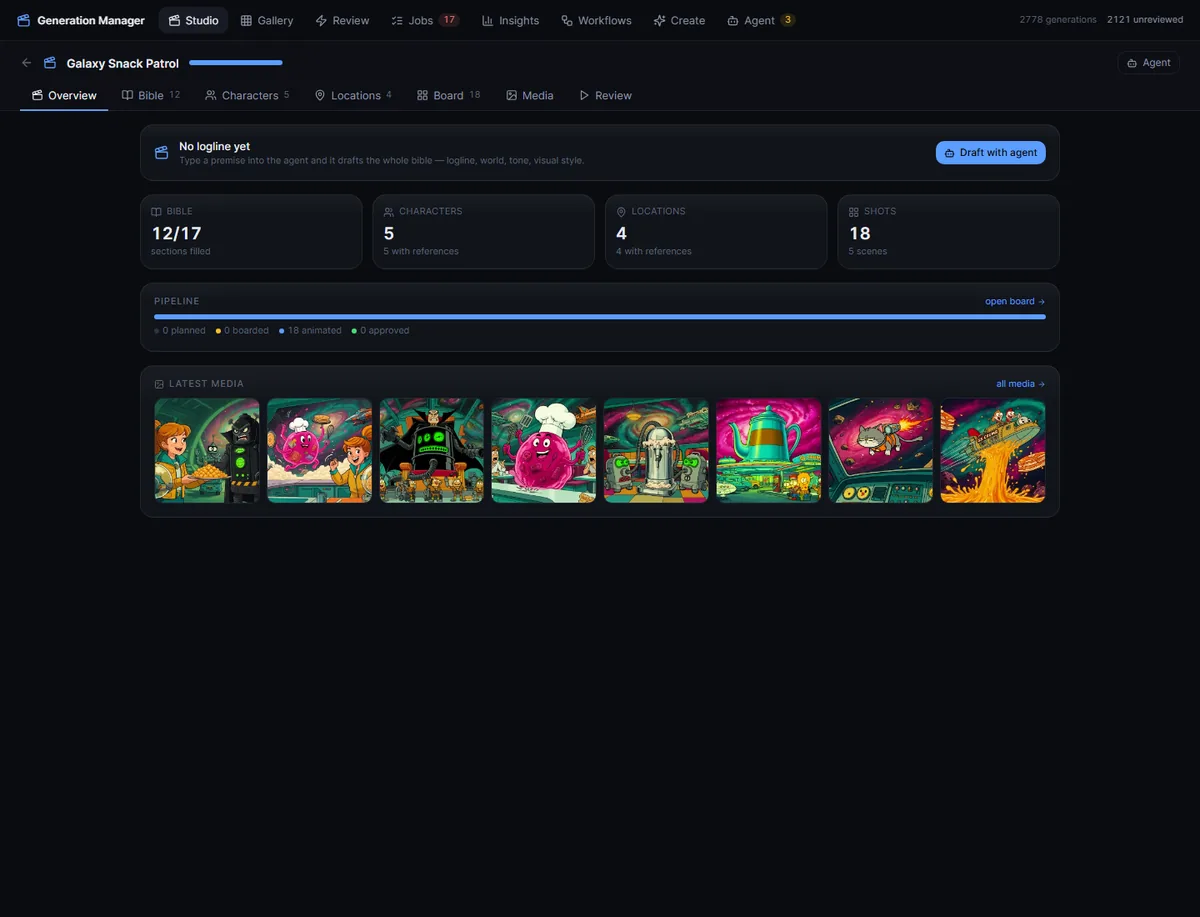
The screenshots in this section use Galaxy Snack Patrol, a fictional demo production created to exercise the workflow.
The overview summarizes narrative progress, reference coverage, scene and shot counts, pipeline state, latest media, and the next useful agent action. Studio state polls independently so long-running renders and drafts appear without a manual refresh.
The bible is long-term production memory
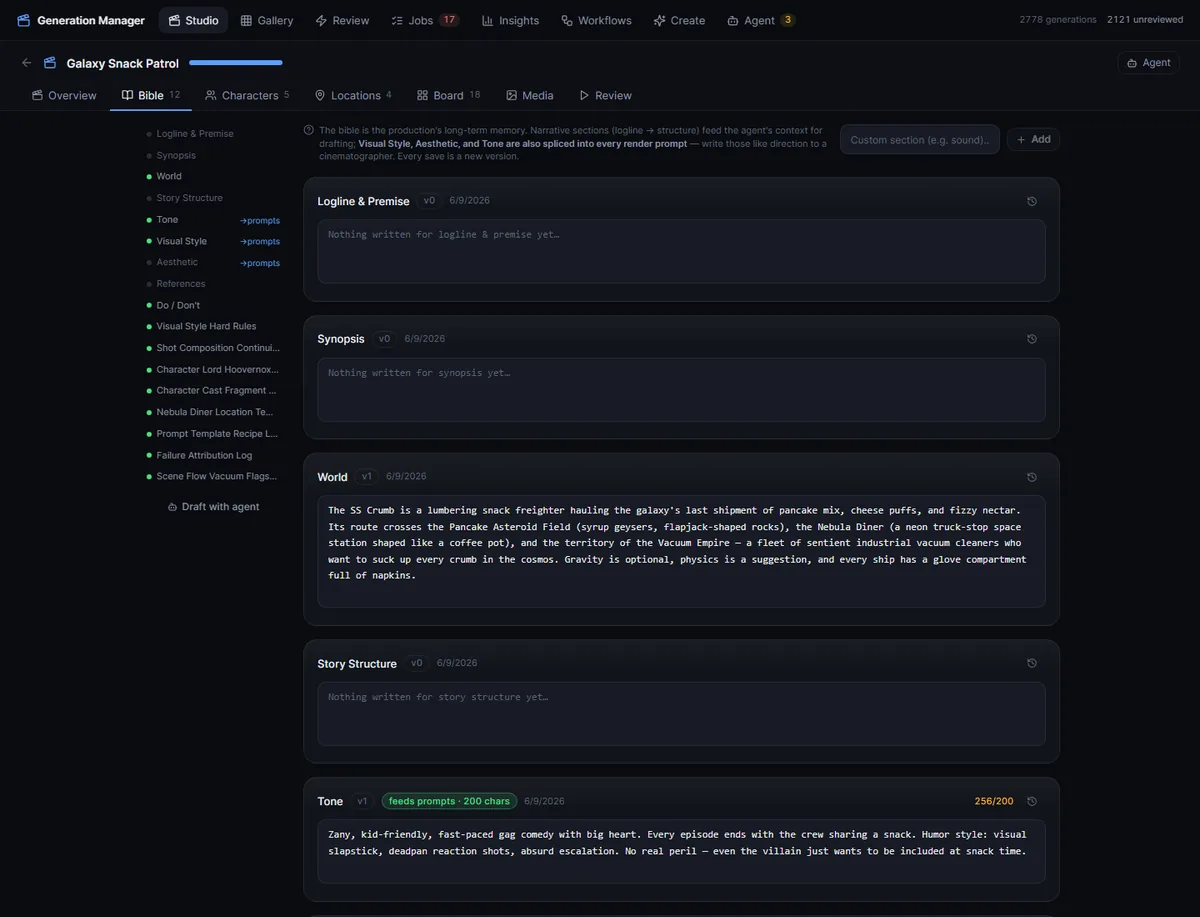
Narrative sections guide drafting; style-oriented sections can also feed bounded text directly into generation prompts.
The bible begins with narrative and visual sections such as logline, synopsis, world, story structure, tone, visual style, aesthetic, references, and do/don’t rules. Custom sections can be added.
Every save creates a version with an optional change note. Earlier versions can be inspected and restored. The editor supports keyboard save, autosizing text, desktop/mobile section navigation, and prompt-budget counters.
Narrative sections enter the production context pack for agent drafting. Visual Style, Aesthetic, and Tone are also spliced into render prompts with bounded budgets of 500, 300, and 200 characters. The budgets keep a large bible from swamping a shot-level instruction.
Characters and locations are reusable generation entities
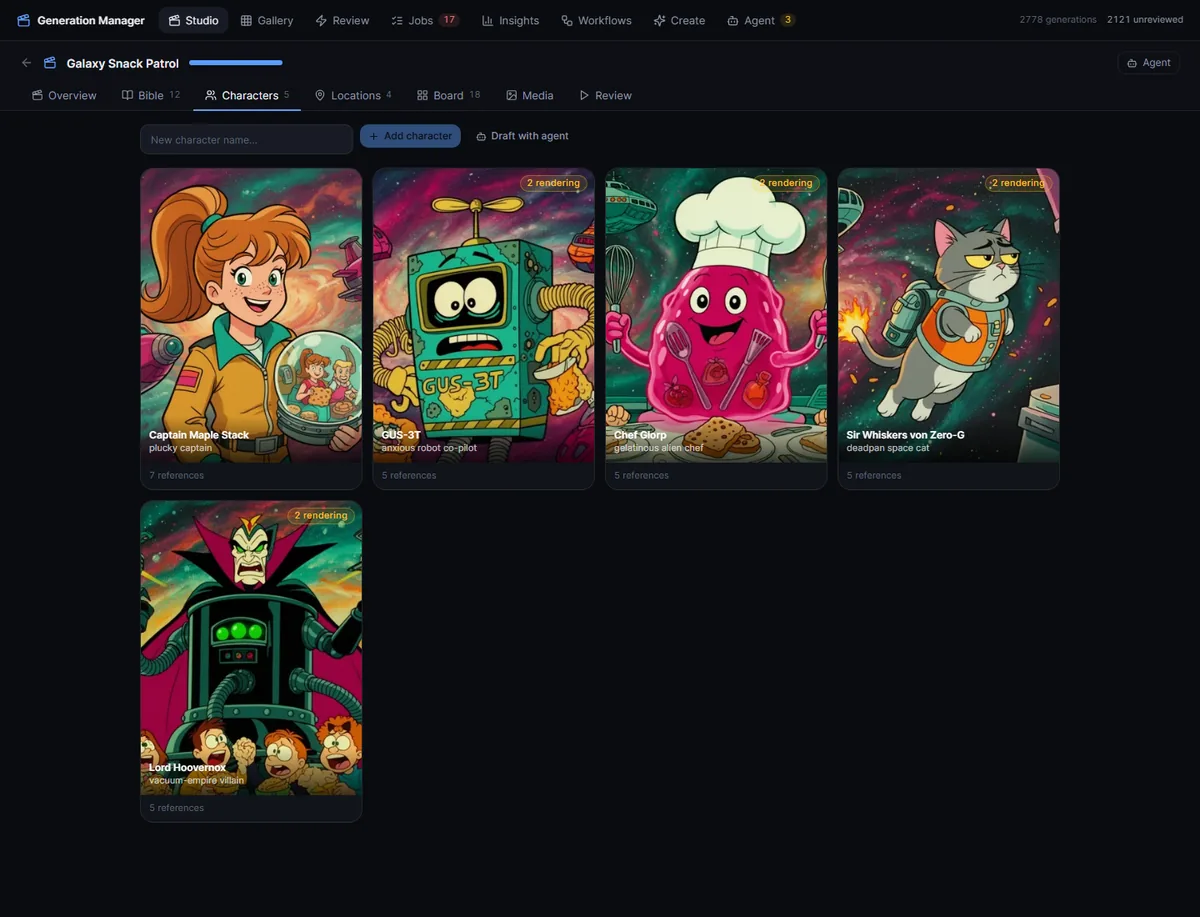
Each character and location stores reusable prompt fragments and canonical visual references.
Characters and locations each have:
- editorial description;
- positive and negative prompt fragments;
- sort order and archive status;
- reference generations;
- render history and active/failed jobs;
- workflow candidates ranked for the entity’s media need.
A character fragment is injected into each shot that includes that character. Location resolution follows a specific precedence:
shot override
    -> scene's selected location
    -> scene's freeform location text
The reference panel shows the exact assembled positive and negative prompt before rendering. It can launch several candidates, display pending and failed states, show existing references, dismiss failed renders, and open results in a lightbox.
Studio can also draft characters or locations from selected images. Those images can come from production media, the broader Gallery, or fresh uploads. The output remains a reviewable draft and changes the database only after acceptance.
Board separates planning, stills, motion, and approval
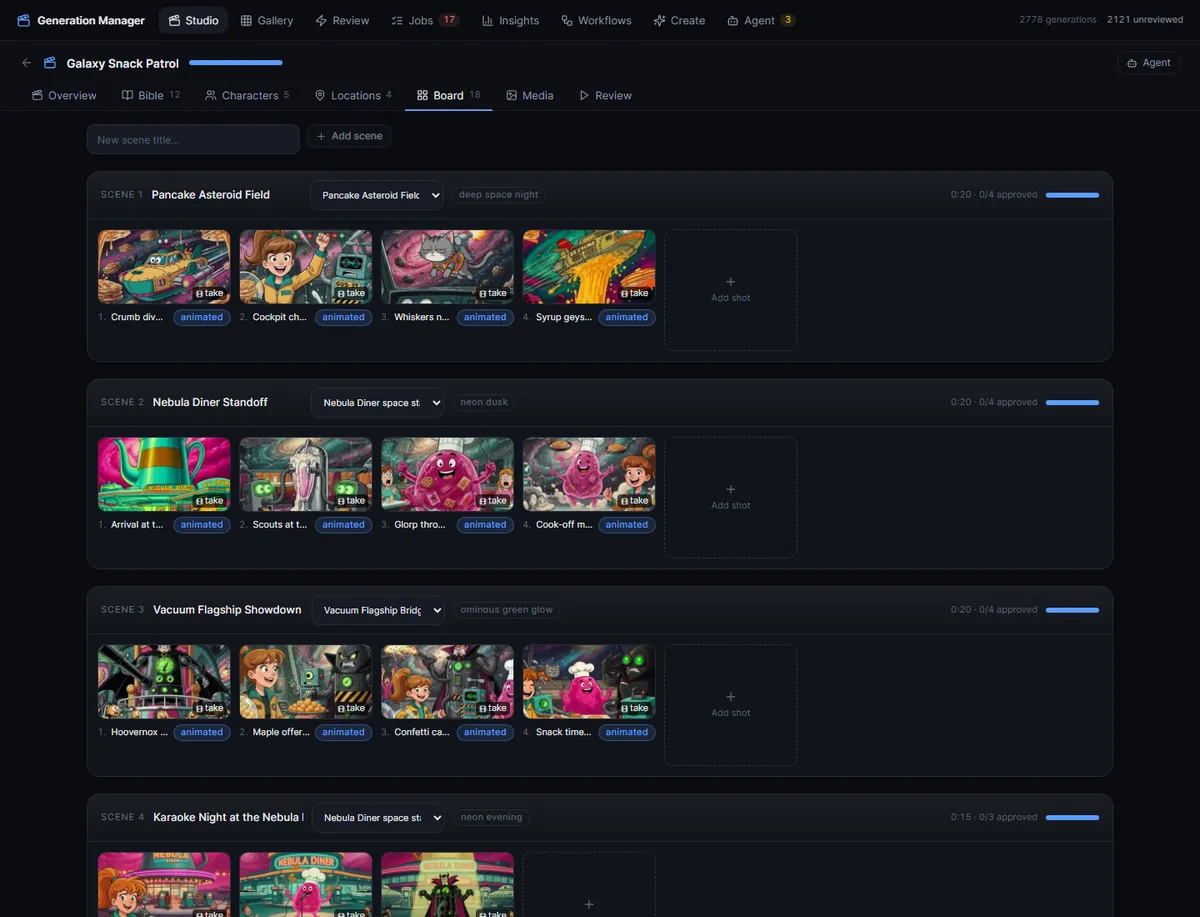
A scene contains ordered shots; each shot can accumulate boards and takes before one take is selected and approved.
Scenes are ordered containers with a title, synopsis, location, time of day, status, and computed runtime and pipeline summary. Shots inside them can be reordered and progress through:
planned -> boarded -> animated -> approvedThe shot drawer has four views:
- Plan stores shot type, camera movement, duration, action/blocking, location override, and participating characters.
- Prompt exposes the complete assembly of shot draft, plan, character fragments, location, and bible style. It can promote that assembly into the authoritative prompt draft.
- Boards holds still-image candidates.
- Takes holds animated candidates and selection state.
Board renders use image workflows. Take renders use video workflows. A take can start from:
- the selected board;
- the previous shot’s selected take, after extracting and staging its last frame;
- no source image.
Spare image slots can be filled with canonical character references. Shot chaining and identity references therefore stay in the normal workflow definition system.
Two takes can be compared side by side. Selecting a winner is separate from approving the shot, and approval is blocked until a take has been selected. Selected takes support non-destructive trim-in and trim-out values.
Media, playback, and export
The Media tab reuses Gallery cards and the same detail inspector, but keeps the scope inside the production. It can filter images, videos, and rating state and hides dropped work by default.
The Review tab assembles selected takes in scene order. During playback, it:
- shows missing shots;
- honors trim windows;
- preloads the next take;
- advances through a clickable shot timeline;
- supports play/pause, previous/next, and fullscreen keyboard controls;
- reports scene and total-film runtime.
Scene and film export use a two-pass FFmpeg pipeline. Every source clip is first normalized to H.264/yuv420p at 24 fps, scaled and padded into a common frame, and given AAC stereo at 48 kHz. A silent stereo track is synthesized for clips without audio so sound does not disappear partway through a mixed-source cut. The normalized clips are then joined as a stream copy into a fast-start MP4.
That normalization lets a 16 fps WebM from one workflow and a 24 fps MP4 with audio from another coexist in the same cut.
The Studio agent is review-first
Studio’s agent can draft:
- bible sections;
- characters and locations;
- characters or locations from images;
- scene breakdowns;
- shot lists;
- storyboard prompts;
- bible updates distilled from review feedback.
A freeform request first goes through a small routing task that selects exactly one supported action or asks for clarification. The proposed action and confidence are shown before the full job runs.
Each result item has a stable draft ID, confidence, rationale, editable content, and pending/accepted/rejected state. “Accept all” is available, but nothing is written until Apply. Only accepted items pass through the production services that update the bible, entity library, scenes, shots, or prompts.
Workflow organization uses the same review gate. Codex can augment deterministic suggestions, but every item remains inert until reviewed and only the accepted set is applied.
The SQLite data model
The 27 tables group into these domains:
| Domain | Main records |
|---|---|
| Generation | generations, input lineage, reviews, metadata |
| Execution | workers, jobs, job attempts |
| Organization | projects and nested folders |
| Workflows | topologies, variants, groups, definitions, compiled shapes, organization drafts |
| Production | bible sections and versions, characters, locations, scenes, shots, links, drafts |
| Taste and agents | predictions, profile versions, worker state, Codex analysis jobs |
| Safety | application instance lease |
The migration function uses idempotent checks instead of a version ledger. It
creates missing tables and indexes, adds missing columns after inspecting
PRAGMA table_info, performs targeted backfills, and contains one conditional
table rebuild for an expanded production-link constraint.
That has worked for a personal application moving quickly, but a formal schema version ledger and reversible migrations would make future upgrade auditing clearer.
Journaling, leases, and one writer
Portable defaults use conservative SQLite settings suitable for a Windows-backed database: a persistent rollback journal, full synchronous writes, foreign keys, and a 30-second busy timeout.
The live container stores its database on a Linux-native named volume and uses WAL with normal synchronous writes. That avoids the locking behavior I saw when the active database lived directly on a host-mounted Windows filesystem.
An application lease records owner, role, host, and heartbeat. It refuses a second active writer and watches for split-brain takeover while several background loops share one database.
Backups are SQLite-aware
The backup service follows this sequence:
- uses SQLite’s online backup API into a local temporary snapshot;
- runs
PRAGMA integrity_check; - gzip-compresses in bounded chunks;
- writes to a temporary name;
- atomically renames only after success;
- prunes with tiered retention.
The current policy runs every 30 minutes, retains 48 recent snapshots, and keeps the newest daily snapshot for seven days. Startup also performs an integrity check, and the earlier migration from a host-backed database checked both the source and copied database before retiring the legacy file.
These backups protect against application and database failure, but they remain local and unencrypted. I still need an encrypted off-host copy and a periodic restore drill.
One Docker image, several runtime roles
The multi-stage image has four distinct build concerns:
- Node 24 builds the React frontend.
- A second Node stage installs and preserves the pinned Codex CLI binary and resources.
- Python 3.12 builds an isolated VibeComfy environment.
- The final Python 3.12 runtime adds FFmpeg, curl, backend dependencies, the compiled SPA, Codex, and VibeComfy.
Uvicorn serves both FastAPI and the compiled SPA, including a safe fallback for
client-side routes. The container health check calls /api/health.
The manager talks to both ComfyUI workers through HTTP. It does not mount the Docker socket. Output and batch roots are read-only; the shared ComfyUI input root is writable so uploads, board frames, and extracted last frames can be staged for future generations.
The service runs with the host user/group mapping rather than root so the mounted Codex state does not acquire root-owned files.
Health and observability
The health payload reports:
- database writability;
- worker reachability and queue remaining;
- Codex binary, version, and mounted-login readiness;
- Gemini and FAL executor configuration;
- VibeComfy compiler readiness;
- instance lease state;
- importer scan state and last error.
Status endpoints separately aggregate generations, jobs, and attempts by state. Worker queue summaries include operation, prompt, model/LoRA, output prefix, queue position, and elapsed time.
The browser shows worker state on Jobs and Codex harness state on Agent. There is not yet a full administrator dashboard for every health field.
Frontend implementation details
The current UI is React 19, TypeScript, React Router 7, TanStack Query 5, Tailwind 4, and Vite 7.
The frontend uses a small typed JSON client and a broad TypeScript API contract. A generation type includes media, prompt, review data, workflow identities, input/output assets, project membership, Agent receipt, and taste prediction. Definition parameter types are discriminated unions, which lets one generic form render text, seed, number, enum, boolean, and media controls safely.
React Query provides:
- one retry by default;
- a five-second stale time;
- targeted polling for status, jobs, workers, agent activity, and active production state;
- cache invalidation after launches, review, queue operations, and drafts.
URL-backed filters replace a large global store. Local modal, drawer, playback, and form state stays inside components.
The visual system uses a near-black canvas, one blue accent, and semantic color: green means keep/success, red means drop/failure, and yellow means warning or needs attention. Navigation labels collapse to icons on smaller screens, Gallery columns respond to width, detail becomes full-screen, and Studio’s agent rail becomes a mobile drawer.
Keyboard support exists in Review, Studio playback, modal/lightbox dismissal, and bible editing. Dialogs carry dialog roles and modal semantics, although complete focus trapping and restoration are still accessibility work to do.
The trusted-local security boundary
Comfy Generation Manager assumes one trusted local operator.
The current HTTP API has no authentication middleware and uses permissive CORS. It can expose prompts, media, workflow graphs, queue controls, project state, and paid cloud launches. It should therefore remain reachable only from a trusted local environment until host-only binding or real authentication and authorization are added.
The MCP confirmation model protects agent calls only. The HTTP API remains unauthenticated.
The bundled Codex process runs inside the container boundary with an ephemeral workspace, structured output, no interactive approvals, and a timeout. The container reuses an existing authenticated CLI state. That is practical for a single trusted operator, but it increases the importance of keeping the API away from untrusted callers.
What I would harden next
Before allowing any non-local access, I would add authentication and authorization to the HTTP API and bind the published port explicitly to the intended interface.
The single-writer lease should also be acquired before migrations, with tighter same-host takeover rules. The current startup performs schema work before it holds the application lease.
There is a small submission gap between ComfyUI accepting a prompt and SQLite recording the attempt. An “intent to submit” row or deterministic adoption token could prevent duplicate work after a crash in that window.
I also need explicit missing-media reconciliation, upload size and content validation, storage-capacity health, backup-age health, and off-host encrypted backups.
The hardest state machines need a conventional backend test suite: migration, queue reconciliation, lost attempts, cancellation, definition versioning, lineage, and recovery. The repository currently relies on focused smoke and integration checks rather than a broad unit-test suite.
On the product side, I want a full health dashboard, complete focus management for dialogs, and carefully designed Gallery bulk actions. The backend can organize multiple generation IDs, but Gallery currently has no general multi-select bulk workflow.
How I verified it while building
The checks cover:
- a production frontend build;
- Python compile checks;
- Docker image and health-path smoke tests;
- MCP reads, write-tool registration, and refusal when
confirm=false; - mutation smoke against a copied database only;
- text and image structured-output smoke for the Codex harness;
- a read-only browser pass across desktop and mobile routes, required content, page errors, and horizontal overflow;
- workflow graph shape, dangling edges, output nodes, and, when a worker is
selected, class availability from
/object_info.
The current checks do not cover every state-machine path.
What I learned
Most of the work happens around generation itself. Before a job reaches a model, the system handles recipe selection, prompt construction, input staging, routing, and queueing. Afterward it handles import, provenance, review, comparison, learning, organization, reuse, and editorial assembly.
The job/attempt split made failures recoverable. Graph metadata made old files queryable, while topology, variant, and exact hashes let me measure workflow performance without giving up reproducibility.
Structured human reviews feed both ordinary analytics and learned taste. Agent actions stay inspectable because they pass through typed tools, structured outputs, receipts, and reviewable drafts.
SQLite has been enough with one application writer, short transactions, explicit journaling, online backups, and large media kept elsewhere.